Sabi Key Rotation System Guide
Introduction
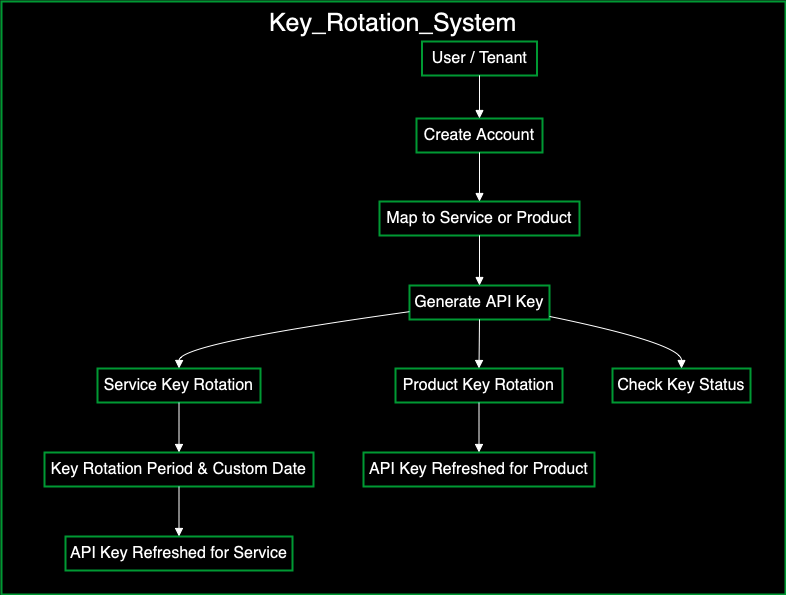
The Key Rotation system in Sabi’s registry service is designed to ensure that cryptographic keys used by tenants to access services, and products on the platform, are periodically refreshed to enhance security. This document will guide you through the key rotation process, the necessary endpoints, and how to configure API key expiration and renewal.
Key rotation applies to both Service API Keys and Product API Keys. This guide covers key rotation for services, and products ensuring you can manage your API keys effectively and securely.
1. Key Management Overview
The Key Management system allows users to create, read, update, and delete cryptographic keys for services, tenants, and products. It also includes automated key rotation, ensuring that keys don’t remain static, reducing the risk of compromise.
Key Features:
- Automatic API Key Generation: Keys are generated when a tenant is mapped to a product or service.
- API Key Rotation: Automatically refresh keys after a defined period or at a custom date.
- Expiration Notifications: Tenants receive email notifications before their API keys expire.
- Custom Expiry Dates: Option to set custom expiration dates for keys.
2. Setting Up Key Rotation for products and Services
When a tenant is mapped to a service or product, an API key is generated, which does not last indefinitely. API keys have a maximum lifespan of two years. Before expiration, the tenant receives email notifications to refresh their API key. If needed, API keys can be set to expire at custom intervals, such as days, months, or even hours.
2.1 Mapping a Tenant to a Service:
After a tenant creates an account, they are mapped to a service using the PATCH /api/v1/tenants/{tenantId}/services/{serviceId}/map endpoint.
Parameters:
tenantId: (Required) The unique identifier of the tenant.serviceId: (Required) The unique identifier of the service.
Sample Request Body:
{
  "userId": "string",
  "config": [
    {
      "label": "Service Configuration",
      "key": "apiKey",
      "value": "string",
      "required": true,
      "valueType": "string",
      "formType": "input"
    }
  ],
  "actionBy": "admin",
  "apiKeyRotationPeriod": "DAYS",  // Options: HOURS, DAYS, MONTHS, YEARS
  "apiKeyRotationValue": 30,
  "apiKeyRotationCustomDate": {},
  "callBackUrl": "string"
}
Request Body:
| Field | Type | Description |
|---|---|---|
userId | string | The identifier of the user initiating the request. |
config | array | An array of configuration settings related to the service. |
config.label | string | The label for the service configuration. |
config.key | string | The key being configured (e.g., apiKey). |
config.value | string | The value associated with the configuration key. |
config.required | boolean | Indicates if this configuration is required (true or false). |
config.valueType | string | The type of the value (e.g., string, number). |
config.formType | string | The type of form field to display for input (e.g., input). |
actionBy | string | The identifier of the admin or entity performing the action. |
apiKeyRotationPeriod | string | The period for API key rotation (Options: HOURS, DAYS, MONTHS, YEARS). |
apiKeyRotationValue | number | The number indicating the frequency of the key rotation (e.g., 30 for 30 days). |
apiKeyRotationCustomDate | object | A custom date for the API key rotation, if applicable. |
callBackUrl | string | The URL to which notifications or callbacks will be sent. |
2.2 Mapping a Tenant to a Product:
After a tenant creates an account, they are mapped to a product using the PATCH /api/v1/tenants/{tenantId}/products/{productId}/map endpoint.
Parameters:
tenantId: (path) The unique identifier of the tenant.productId: (path) The unique identifier of the product.
Sample Request Body:
{
  "userId": "string",
  "services": [
    {
      "serviceId": "string",
      "servicesConfig": [
        {
          "label": "string",
          "key": "string",
          "value": "string",
          "required": true,
          "valueType": "string",
          "formType": "input",
          "formOptions": [
            {
              "label": "string",
              "value": "string",
              "key": "string"
            }
          ]
        }
      ]
    }
  ],
  "config": {
    "mobileApp": [
      {
        "label": "string",
        "key": "string",
        "value": "string",
        "required": true,
        "valueType": "string",
        "formType": "input",
        "formOptions": [
          {
            "label": "string",
            "value": "string",
            "key": "string"
          }
        ]
      }
    ],
    "pwaApp": [
      {
        "label": "string",
        "key": "string",
        "value": "string",
        "required": true,
        "valueType": "string",
        "formType": "input",
        "formOptions": [
          {
            "label": "string",
            "value": "string",
            "key": "string"
          }
        ]
      }
    ],
    "webApp": [
      {
        "label": "string",
        "key": "string",
        "value": "string",
        "required": true,
        "valueType": "string",
        "formType": "input",
        "formOptions": [
          {
            "label": "string",
            "value": "string",
            "key": "string"
          }
        ]
      }
    ],
    "adminApp": [
      {
        "label": "string",
        "key": "string",
        "value": "string",
        "required": true,
        "valueType": "string",
        "formType": "input",
        "formOptions": [
          {
            "label": "string",
            "value": "string",
            "key": "string"
          }
        ]
      }
    ]
  },
  "actionBy": "string",
  "apiKeyRotationPeriod": "HOURS",
  "apiKeyRotationValue": 0,
  "apiKeyRotationCustomDate": {},
  "callBackUrl": "string"
}
Request Body:
| Field | Type | Description |
|---|---|---|
userId | string | The identifier of the user initiating the request. |
services | array | An array of services linked to the product with their respective configurations. |
services.serviceId | string | The ID of the service linked to the product. |
services.servicesConfig | array | Configuration details for each service. |
servicesConfig.label | string | The label for the service configuration. |
servicesConfig.key | string | The key being configured (e.g., apiKey). |
servicesConfig.value | string | The value associated with the configuration key. |
servicesConfig.required | boolean | Indicates if the configuration is required (true or false). |
servicesConfig.valueType | string | The type of the value (e.g., string, number). |
servicesConfig.formType | string | The form type for input (e.g., input). |
servicesConfig.formOptions | array | Optional form options for the configuration. |
config.mobileApp | array | Configuration details specific to the mobile app. |
config.pwaApp | array | Configuration details specific to the PWA app. |
config.webApp | array | Configuration details specific to the web app. |
config.adminApp | array | Configuration details specific to the admin app. |
actionBy | string | The identifier of the admin or entity performing the action. |
apiKeyRotationPeriod | string | The period for API key rotation (Options: HOURS, DAYS, MONTHS, YEARS). |
apiKeyRotationValue | number | The number indicating the frequency of the key rotation. |
apiKeyRotationCustomDate | object | A custom date for API key rotation, if applicable. |
callBackUrl | string | The URL for sending notifications or callbacks. |
3. Configuring API Key Rotation
To ensure API keys are secure, you can use the POST /api/v1/tenants/{tenantId}/rotations endpoint to configure automatic key rotations for both Service API Keys and Product API Keys.
Parameters:
tenantId: (path) The unique identifier of the tenant.
Sample Request Body:
{
  "userId": "string",
  "actionBy": "admin",
  "apiKeyRotationPeriod": "DAYS",  // Options: HOURS, DAYS, MONTHS, CUSTOM
  "apiKeyRotationValue": 30,
  "apiKeyRotationCustomDate": "2024-12-31"
}
Request Body
| Field | Type | Description |
|---|---|---|
userId | string | The identifier of the user initiating the key rotation request. |
actionBy | string | The identifier of the entity or admin performing the action (e.g., "admin"). |
apiKeyRotationPeriod | string | Defines the time interval for the API key rotation. Options are HOURS, DAYS, MONTHS, or CUSTOM. |
apiKeyRotationValue | number | Specifies the value corresponding to the apiKeyRotationPeriod (e.g., 30 days). |
apiKeyRotationCustomDate | string | A custom date for the API key rotation if the CUSTOM option is used for apiKeyRotationPeriod. Format: YYYY-MM-DD. |
4. API Key Renewal for Tenants and Services
4.1 API Key Rotation for Tenants
When an API key expires, it must be renewed to maintain system functionality. You can use the POST /api/v1/tenants/{tenantId}/key-refresh/{apiKey} endpoint to refresh an API key for a specific tenant.
Parameters:
tenantId: (path) The unique identifier of the tenant.apiKey: (path) The current API key that needs to be refreshed.
4.2 API Key Rotation for Tenants
You can use the POST /api/v1/services/{serviceId}/refresh-key endpoint to refresh or rotate the API key for a specific service. This ensures that the API key is updated without requiring manual intervention, enhancing security by rotating keys periodically.
Parameters:
serviceId(path): The unique identifier of the service for which the API key is being refreshed.apiKey(header): The current API key that is being refreshed.
Sample Request Body
{
  "apiKeyRotationPeriod": "HOURS",
  "apiKeyRotationValue": 0,
  "apiKeyRotationCustomDate": {},
  "actionBy": "string",
  "callBackUrl": "string"
}
Request Body
| Field | Type | Description |
|---|---|---|
apiKeyRotationPeriod | string | Defines the time unit for the key rotation (e.g., HOURS, DAYS, MONTHS, or CUSTOM). |
apiKeyRotationValue | number | Specifies how often the API key should rotate, based on the chosen period (e.g., rotate every 30 days). |
apiKeyRotationCustomDate | object | A custom date for the API key rotation if the CUSTOM period is selected. |
actionBy | string | The identifier of the entity or admin performing the action (e.g., "admin"). |
callBackUrl | string | The URL to which notifications or results of the key refresh operation will be sent. |
5. Key Rotation by Administrators
Administrators have additional privileges for managing key rotation and mapping tenants to services or products. This section outlines the admin-specific endpoints, including key rotation for tenants and mapping services or products to tenants.
5.1 Mapping a Tenant to a Service (Admin)
Admins can map a tenant to a service with the PATCH /api/v1/admins/tenants/{tenantId}/services/{serviceId}/map endpoint, configuring service-specific settings and defining the API key rotation period.
Parameters:
tenantId: (path) The unique identifier of the tenant.serviceId: (path) The unique identifier of the service.
Sample Request Body:
{
  "userId": "string",
  "config": [
    {
      "label": "Service Configuration",
      "key": "string",
      "value": "string",
      "required": true,
      "valueType": "string",
      "formType": "input",
      "formOptions": [
        {
          "label": "string",
          "value": "string",
          "key": "string"
        }
      ]
    }
  ],
  "actionBy": "string",
  "apiKeyRotationPeriod": "HOURS",  // Options: HOURS, DAYS, MONTHS, CUSTOM
  "apiKeyRotationValue": 0,
  "apiKeyRotationCustomDate": {},
  "callBackUrl": "string"
}
Request Body:
| Field | Type | Description |
|---|---|---|
userId | string | The identifier of the user initiating the key rotation request. |
config | array | An array of configurations related to the service being mapped. |
config.label | string | A descriptive label for the service configuration. |
config.key | string | The key name being configured (e.g., apiKey). |
config.value | string | The value associated with the key. |
config.required | boolean | Indicates whether this configuration is mandatory (true or false). |
config.valueType | string | The data type of the configuration value (e.g., string, number). |
config.formType | string | The type of form input (e.g., input, select). |
config.formOptions | array | Optional form options for fields such as dropdowns or selections. |
config.formOptions.label | string | A label for each form option (e.g., "Option 1"). |
config.formOptions.value | string | The value associated with the form option. |
config.formOptions.key | string | The key name for the form option. |
actionBy | string | The identifier of the user or entity performing the action (e.g., "admin"). |
apiKeyRotationPeriod | string | The time period for API key rotation (Options: HOURS, DAYS, MONTHS, CUSTOM). |
apiKeyRotationValue | number | Specifies the interval for the key rotation based on the chosen period (e.g., 30 for 30 days). |
apiKeyRotationCustomDate | object | A custom date object for API key rotation if a specific date is required. |
callBackUrl | string | The URL to which notifications or updates related to key rotation will be sent. |
5.2 Mapping a Tenant to a Product (Admin)
Admins can also map a tenant to a product, allowing for configuration of multiple services and application-specific settings, such as for mobile, PWA, web, and admin apps.
API Endpoint:
PATCH /api/v1/admins/tenants/{tenantId}/products/{productId}/map
Parameters:
- tenantId: (path) The unique identifier of the tenant.
- productId: (path) The unique identifier of the product.
Sample Request Body:
{
  "userId": "string",
  "services": [
    {
      "serviceId": "string",
      "servicesConfig": [
        {
          "label": "string",
          "key": "string",
          "value": "string",
          "required": true,
          "valueType": "string",
          "formType": "input",
          "formOptions": [
            {
              "label": "string",
              "value": "string",
              "key": "string"
            }
          ]
        }
      ]
    }
  ],
  "config": {
    "mobileApp": [
      {
        "label": "string",
        "key": "string",
        "value": "string",
        "required": true,
        "valueType": "string",
        "formType": "input",
        "formOptions": [
          {
            "label": "string",
            "value": "string",
            "key": "string"
          }
        ]
      }
    ],
    "pwaApp": [
      {
        "label": "string",
        "key": "string",
        "value": "string",
        "required": true,
        "valueType": "string",
        "formType": "input",
        "formOptions": [
          {
            "label": "string",
            "value": "string",
            "key": "string"
          }
        ]
      }
    ],
    "webApp": [
      {
        "label": "string",
        "key": "string",
        "value": "string",
        "required": true,
        "valueType": "string",
        "formType": "input",
        "formOptions": [
          {
            "label": "string",
            "value": "string",
            "key": "string"
          }
        ]
      }
    ],
    "adminApp": [
      {
        "label": "string",
        "key": "string",
        "value": "string",
        "required": true,
        "valueType": "string",
        "formType": "input",
        "formOptions": [
          {
            "label": "string",
            "value": "string",
            "key": "string"
          }
        ]
      }
    ]
  },
  "actionBy": "string",
  "apiKeyRotationPeriod": "HOURS",
  "apiKeyRotationValue": 0,
  "apiKeyRotationCustomDate": {},
  "callBackUrl": "string"
}
Request Body
| Field | Type | Description |
|---|---|---|
userId | string | The identifier of the user initiating the request. |
services | array | An array of services linked to the tenant, each with its configuration. |
services.serviceId | string | The unique ID of the service being mapped. |
services.servicesConfig | array | A list of configuration settings for the mapped services. |
servicesConfig.label | string | The label for the service configuration. |
servicesConfig.key | string | The key associated with the configuration (e.g., apiKey). |
servicesConfig.value | string | The value for the corresponding configuration key. |
servicesConfig.required | boolean | Indicates whether this configuration is required (true or false). |
servicesConfig.valueType | string | The type of value (e.g., string, number). |
servicesConfig.formType | string | The type of form input (e.g., input, select). |
servicesConfig.formOptions | array | An array of form options for input, useful for dropdowns or selections. |
servicesConfig.formOptions.label | string | A label for the form option. |
servicesConfig.formOptions.value | string | The value for the form option. |
servicesConfig.formOptions.key | string | The key for the form option. |
config | object | The configuration for various app environments (e.g., mobile, web, admin). |
config.mobileApp | array | An array of configuration settings specific to the mobile app. |
config.pwaApp | array | An array of configuration settings specific to the PWA app. |
config.webApp | array | An array of configuration settings specific to the web app. |
config.adminApp | array | An array of configuration settings specific to the admin app. |
actionBy | string | The identifier of the entity or admin performing the action (e.g., admin). |
apiKeyRotationPeriod | string | The period for API key rotation (Options: HOURS, DAYS, MONTHS, CUSTOM). |
apiKeyRotationValue | number | Specifies the value corresponding to the API key rotation period (e.g., 30). |
apiKeyRotationCustomDate | object | A custom date object used when setting a specific expiration date for the key. |
callBackUrl | string | The URL to which notifications or callbacks are sent after the key rotation. |
5.3. Admin: Initiating Key Rotation for a Tenant
Admins can manually initiate an API key rotation for a tenant using the POST /api/v1/admins/tenants/{tenantId}/rotations endpoint. This allows the admin to set the rotation period and customize the API key expiration settings.
Parameters:
tenantId: (path) The unique identifier of the tenant.
Sample Request Body:
{
  "userId": "string",
  "actionBy": "string",
  "apiKeyRotationPeriod": "HOURS",  // Options: HOURS, DAYS, MONTHS, CUSTOM
  "apiKeyRotationValue": 0,
  "apiKeyRotationCustomDate": "string"
}
Request Body
| Field | Type | Description |
|---|---|---|
userId | string | The identifier of the user initiating the API key rotation request. |
actionBy | string | The identifier of the entity or admin performing the action (e.g., "admin"). |
apiKeyRotationPeriod | string | Defines the time interval for API key rotation. Options are HOURS, DAYS, MONTHS, or CUSTOM. |
apiKeyRotationValue | number | Specifies the value corresponding to the API key rotation period (e.g., 30 for 30 days). |
apiKeyRotationCustomDate | string | A custom date for the API key rotation if the CUSTOM period is used. The date should be in a string format (e.g., "2024-12-31"). |
6. Check API Key Status
You can use the GET /api/v1/services/keys/{apiKey}/active to verify the status of a given API key, determining whether it is active and valid for use.
Parameters
apiKey: (path) The unique API key being checked for status.
7. Notifications and Expiry Management
Before an API key expires (for both services and products), tenants are notified via email. The notification contains important information such as the expiration date and instructions on how to refresh the key.
Key Expiry Notifications
Default Expiration: The default maximum lifespan for an API key is two years. Before it expires, tenants will be notified via email.
Custom Expiration: Tenants can configure custom intervals for key expiration. Notifications will be sent accordingly.