An Illustrated Guide to Understanding the Katsu Wallet DB, Its Processes and Computations
In the heart of every digital wallet lies an infrastructure that connects users, transactions, and banking systems. The Katsu Wallet DB is no exception, as its processes ensure smooth wallet-to-bank, wallet-to-wallet, and payment collection operations. This document will dive deep into the intricate workings of Katsu Wallet DB, explore its computational flow, API endpoints, the role of core banking (CBA), and how everything harmonizes to deliver a good banking experience.
The Core Players in Katsu Wallet DB
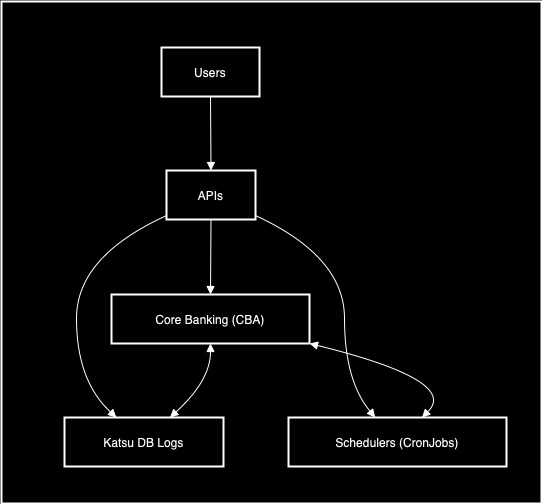
Different entities collaborate to achieve the financial ecosystem which is Katsu. Some of those entities include:
- Users: Individuals or businesses that initiate transactions.
- APIs: The bridges that facilitate communication between Katsu Wallet DB and external systems.
- Core Banking (CBA): The backbone that connects Katsu Wallet DB to financial institutions for validation, reconciliation, and settlement.
- Schedulers (CronJobs): Automated tasks that ensure transactions are processed faster.
- Katsu DB Logs: The record-keepers for every transaction, they ensure traceability.
The Journey of a Transaction in Katsu Wallet DB
Every transaction in Katsu follows a process, whether it’s wallet-to-wallet, wallet-to-bank, or payment collection. Let’s break this journey into five key stages:
1. Initiate the Transaction
The process begins when a user initiates a transaction using Katsu's API endpoints. For example:
POST /accounts/persons: This endpoint creates a user’s account by accepting parameters liketenantId,countryCode, and personal details in the request body.
At this stage:
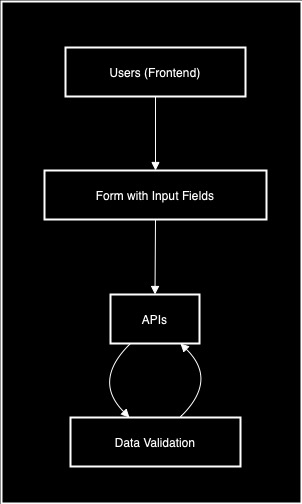
- Users submit their data through a form or frontend.
- APIs validate the incoming data format.
2. Validate the Request
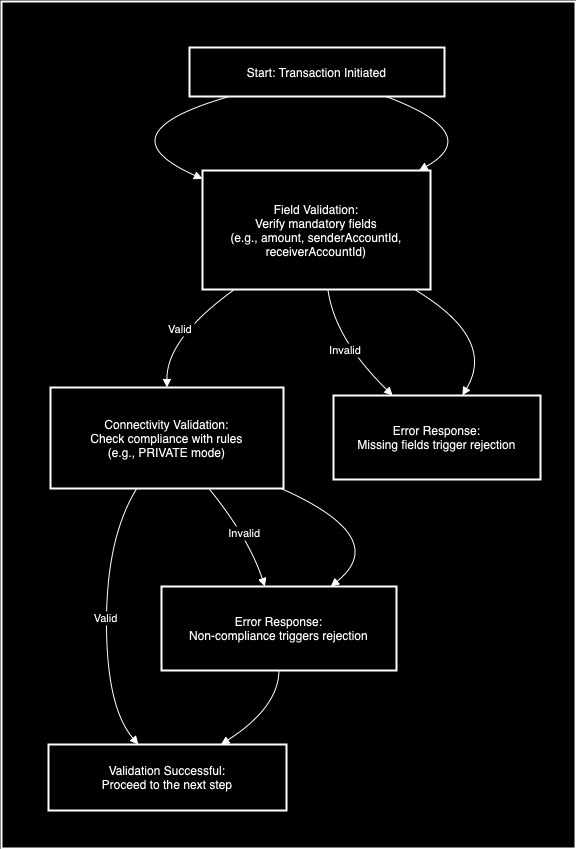
Once a transaction is initiated, the system ensures the request is valid. This involves two critical checks:
- Verify all mandatory fields (e.g.,
amount,senderAccountId,receiverAccountId) are provided. Missing fields trigger an immediate error response. - Ensure the request complies with connectivity rules (e.g.,
PRIVATEmode). The system rejects requests that fail this check are rejected.
3. Prevent Duplicate Transactions
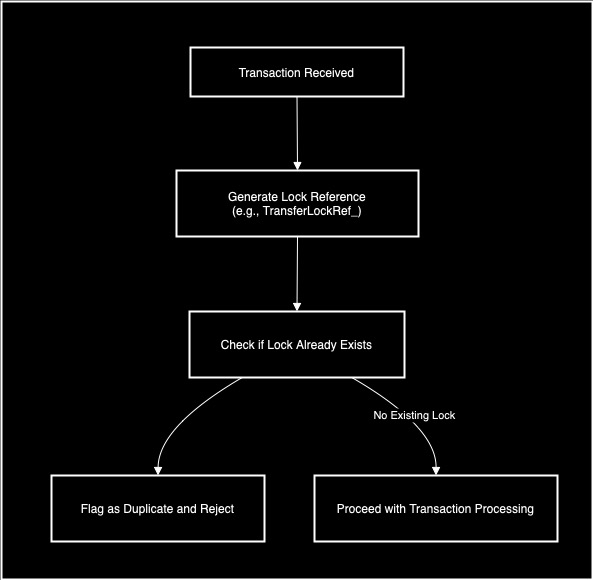
Katsu Wallet DB employs a Redis-based locking mechanism to avoid processing identical transactions simultaneously.
- A unique lock reference is generated (e.g.,
TransferLockRef_<RequestId>). - If a lock already exists for the transaction, it is flagged as a duplicate and immediately rejected.
4. Log Valid Transactions
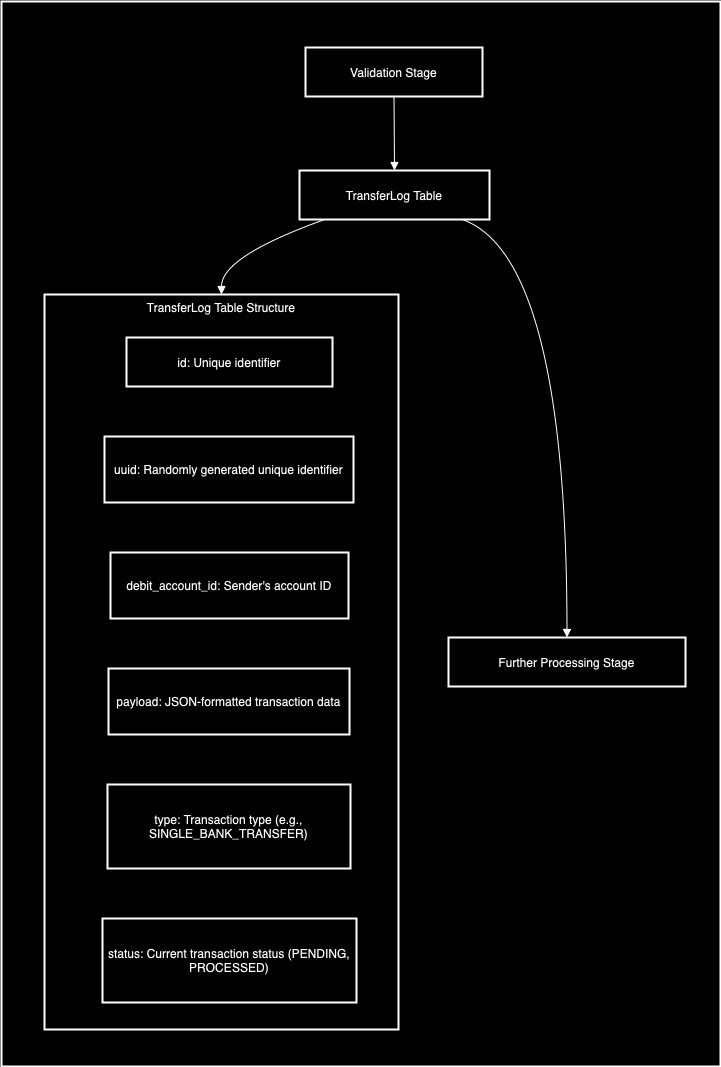
Transactions passing the validation stage are logged in the TransferLog table for further processing. Here’s the table structure:
| Column | Description |
|---|---|
id | Unique identifier |
uuid | Randomly generated unique identifier |
debit_account_id | Sender's account ID |
payload | JSON-formatted transaction data |
type | Transaction type (e.g., SINGLE_BANK_TRANSFER) |
status | Current transaction status (PENDING, PROCESSED) |
5. Process Transactions on Schedule
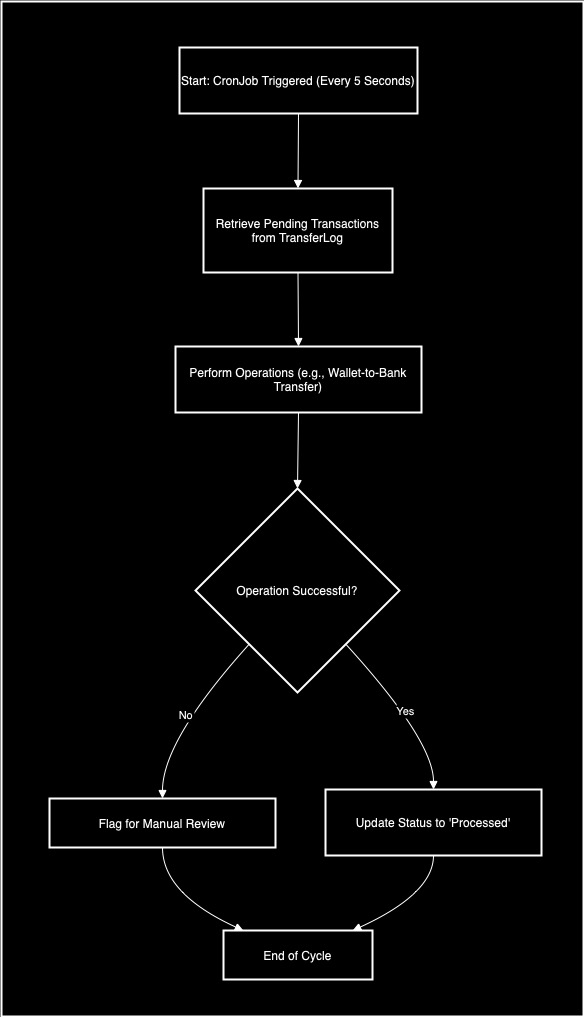
A CronJob automatically processes pending transactions at regular intervals (e.g., every 5 seconds). The steps include:
- Retrieve pending transactions from the
TransferLog. - Execute the required operations (e.g., transferring funds from a wallet to a bank).
- Update the transaction status to Processed or flag it for manual review if an error occurs.
Wallet-to-Wallet vs. Wallet-to-Bank Transfers
Katsu Wallet DB processes transactions in two primary ways, each tailored to specific use cases and system integrations:
Wallet-to-Wallet Transfers
Wallet-to-wallet transactions operate entirely within the Katsu Wallet DB ecosystem. These transfers:
- Move funds quickly and directly, bypassing any interaction with external financial systems.
- Process seamlessly within Katsu, handling transfers between user accounts managed internally. For more details on the API endpoint used for wallet-to-wallet transfers, see the Wallet-to-Wallet API Documentation .
Wallet-to-Bank Transfers
Wallet-to-Bank transfers leverage Core Banking (CBA) to facilitate interactions with external financial systems. The process includes:
- The system validates the sender's and receiver's bank account details.
- It then confirms that sufficient funds exist before proceeding with the transfer.
- Funds move between banks to finalize the transaction. For details on the API endpoints used in Wallet-to-Bank transfers, see the Wallet-to-Bank API Documentation.
Charge Management and Payment Methods
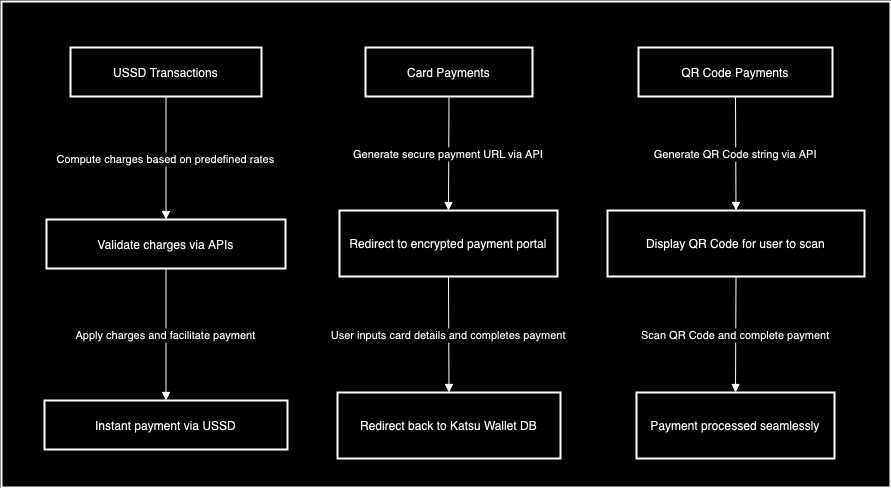
Katsu supports multiple payment methods, each with tailored APIs to ensure good user experiences:
USSD Transactions
- Charges are computed based on predefined rates, ensuring transparency.
- API endpoints validate and apply these charges, facilitating instant payment via USSD codes.
Card Payments
- APIs generate a secure URL, redirecting users to an encrypted payment portal.
- Users input their card details, complete the transaction, and are redirected back to Katsu Wallet DB.
QR Code Payments
- The system generates a string-based QR code using APIs.
- Users scan the QR code to initiate and complete payment seamlessly.
The Interplay with Core Banking (CBA)
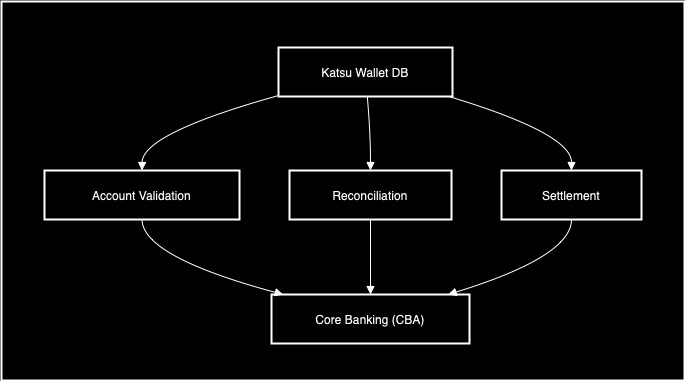
Core Banking (CBA) ensures Katsu’s ecosystem integrates seamlessly with external financial institutions. Its core functions include:
- Account Validation: The CBA Verifies account activity and details for both sender and receiver.
- Reconciliation: They also compare and match transaction records between Katsu Wallet DB and the banking system.
- Settlement: The CBA completes the final leg of fund transfers between banks.
Key API Endpoints in the Katsu Wallet Ecosystem
Below are critical API endpoints that power Katsu Wallet DB operations:
| API Endpoint | Description |
|---|---|
POST /accounts/persons | Create a user account. |
| POST /accounts/businesses | Create a business account. |
| POST /webhooks/{paymentmethod} | Handle webhook for a specific payment method. |
| POST /transfers/intra/wallet | Perform an intra-wallet transfer. |
| POST /transfers/inter/bank | Perform an inter-bank transfer. |
| POST /payments/nqr/invokedynamicqr | Invoke a dynamic QR code for NQR payments. |
| POST /payments/ussd/invokereference | Invoke a reference for USSD payments. |
| POST /payments/paylink/InvokePayment | Invoke a payment via Paylink. |
|
Final Thoughts
Katsu Wallet DB is more than a transactional platform—it’s a unified financial ecosystem. Through seamless collaboration between:
- APIs that power interactions with external systems.
- Core Banking that ensures validation, reconciliation, and settlement.
- Internal Mechanisms that guarantees traceability and operational efficiency.
Katsu ensures every transaction, regardless of type, meets the highest standards of security, accuracy, and user satisfaction.