Sabi Products Loan System Guide
This guide provides an overview of the loan application process, loan management, and tracking using Sabi's loan API system. It covers key API endpoints, product-specific use cases, and explains how to view and track loan applications.
1. Prerequisites
Before using the loan system, ensure you meet these requirements:
- Business and Tenant IDs: You will need valid
businessIdandtenantIdto apply for and track loans. - KYC Compliance: Users must have completed the Know Your Customer (KYC) process.
- User Role: Only authorized users such as business owners or administrators can apply for loans.
2. Loan Application Process Overview
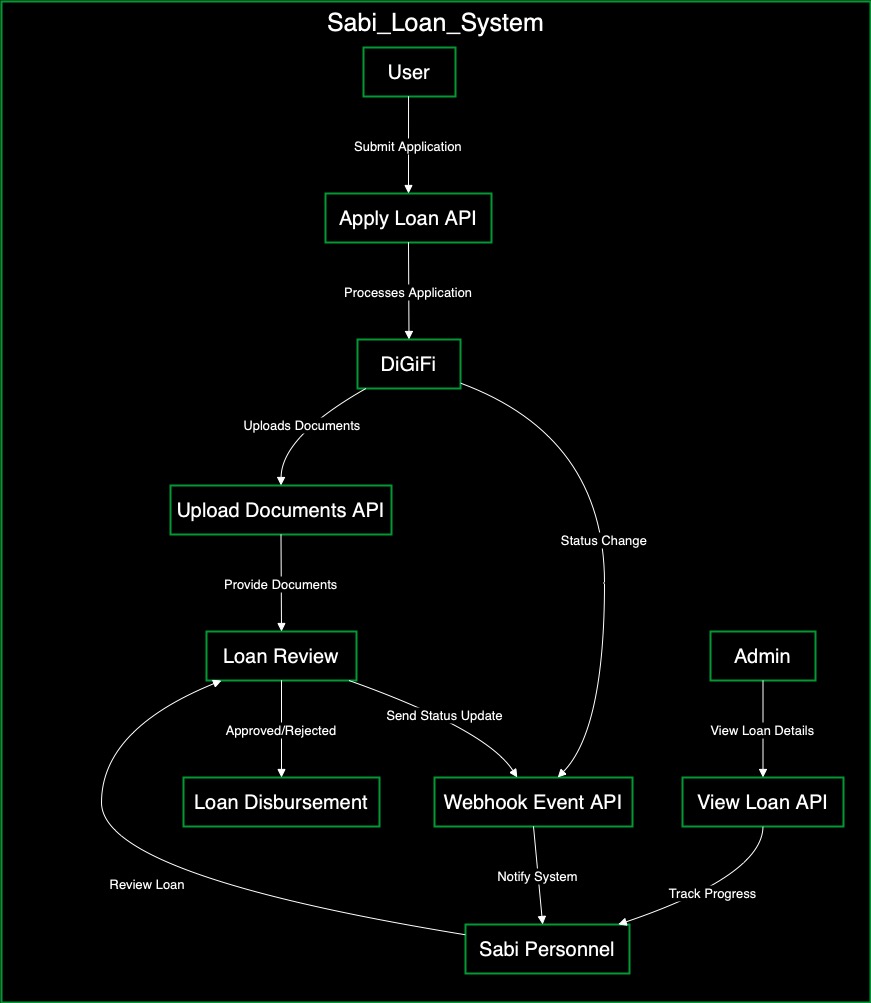
The loan application process in Sabi platforms follows these steps:
- Loan Application: The user submits a loan application via the Sabi platform.
- Loan Processing: DiGiFi, the internal loan management system, processes these applications.
- Loan Review: The loan goes through various review stages by authorized personnel.
- Status Updates: DiGiFi triggers webhooks to notify the system of changes in loan status.
- Disbursement: Approved loans are disbursed to the applicant.
Available Loan Types
The following types of loans are available on Sabi platforms:
- Inventory Financing
- Commodity Financing
- Principal Trading
- Working Capital
- Invoice Discounting
3. Loan Application API Endpoints
To interact with the loan system on Sabi platforms, several API endpoints are available for submitting loan applications, uploading documents, and tracking the status of loan requests. These endpoints allow businesses and tenants to apply for various loan types, manage loan-related documentation, and monitor loan progress across the platform.
3.1 Loan Application API (Businesses)
Businesses can submit loan applications with the PATCH /api/v1/businesses/{businessId}/tenants/{tenantId}/loan/apply endpoint.
Parameters:
| Parameter | Type | Location | Description |
|---|---|---|---|
businessId | string | Path | The ID of the business applying for the loan. |
tenantId | string | Path | The ID of the tenant making the loan request. |
Request Body Example:
{
  "productCategory": "Inventory Financing",
  "productType": "Agric Commodities",
  "customProductType": "string",
  "productList": "string",
  "loanType": "Domestic",
  "productUnit": "Barrels",
  "productQuantity": 0,
  "productUnitPurchasePrice": 0,
  "productUnitSellingPrice": 0,
  "logisticsCostPerTruck": 0,
  "logisticsNumberOfTrucks": 0,
  "loanAmount": 0,
  "paymentTenorInDays": 0,
  "requestId": "string",
  "offTakerId": "string",
  "offTakerName": "string",
  "offTakerEmail": "string",
  "offTakerAddress": "string",
  "loanOriginator": "TRACE",
  "loanPurpose": "string",
  "invoiceIssuedDate": "string",
  "otherCostAmount": 0,
  "otherCostDescription": "string",
  "docLinks": [
    {
      "name": "string",
      "link": "string"
    }
  ]
}
3.2 Upload Loan Documents (Tenant)
Tenants can upload documents for a loan application with the POST /api/v1/loans/documents/{requestId}/tenants/{tenantId} endpoint.
Parameters:
| Parameter | Type | Location | Description |
|---|---|---|---|
requestId | string | Path | The ID of the loan request. |
tenantId | string | Path | The ID of the tenant uploading the documents. |
service-api-key | string | Header | API key for authentication. |
service-api-code | string | Header | API code for additional authentication. |
Request Body Example:
{
  "docLinks": [
    {
      "name": "Invoice",
      "link": "https://example.com/invoice.pdf"
    }
  ]
}
3.3 Upload Loan Documents (General)
You can upload a loan request without tenant-specific information with the POST /api/v1/loans/documents/{requestId} endpoint.
Parameters:
| Parameter | Type | Location | Description |
|---|---|---|---|
requestId | string | Path | The ID of the loan request. |
Request Body Example:
{
  "docLinks": [
    {
      "name": "Contract",
      "link": "https://example.com/contract.pdf"
    }
  ]
}
3.4 Loan Application API (Admins)
Admins can apply for a loan on behalf of a business and tenant with the PATCH /api/v1/admins/businesses/{businessId}/tenants/{tenantId}/loan/apply endpoint.
Parameters:
| Parameter | Type | Location | Description |
|---|---|---|---|
businessId | string | Path | The ID of the business applying for the loan. |
tenantId | string | Path | The ID of the tenant associated with the loan request. |
Request Body Example:
{
  "productCategory": "Inventory Financing",
  "productType": "Agric Commodities",
  "customProductType": "string",
  "productList": "string",
  "loanType": "Domestic",
  "productUnit": "Barrels",
  "productQuantity": 0,
  "productUnitPurchasePrice": 0,
  "productUnitSellingPrice": 0,
  "logisticsCostPerTruck": 0,
  "logisticsNumberOfTrucks": 0,
  "loanAmount": 0,
  "paymentTenorInDays": 0,
  "requestId": "string",
  "offTakerId": "string",
  "offTakerName": "string",
  "offTakerEmail": "string",
  "offTakerAddress": "string",
  "loanOriginator": "TRACE",
  "loanPurpose": "string",
  "invoiceIssuedDate": "string",
  "otherCostAmount": 0,
  "otherCostDescription": "string",
  "docLinks": [
    {
      "name": "string",
      "link": "string"
    }
  ]
}
4. Managing and Tracking Loans
The following endpoints allow users to view and manage their loan applications, track progress, and access detailed loan information.
4.1 View Loan History (General)
Users can track the history of their loan applications with the
GET /api/v1/loans/{loanId}/businesses/{businessId}/tenants/{tenantId} endpoint.
Parameters:
| Parameter | Type | Location | Description |
|---|---|---|---|
loanId | string | Path | The ID of the loan application. |
businessId | string | Path | The ID of the business. |
tenantId | string | Path | The ID of the tenant. |
Response:
- 200 OK: Loan history retrieved successfully.
4.2 View Loan Details (General)
Users can view detailed loan information, such as repayment schedules and interest rates with the GET /api/v1/loans/requests/{requestId}/tenants/{tenantId} endpoint.
Parameters:
| Parameter | Type | Location | Description |
|---|---|---|---|
requestId | string | Path | The ID of the loan request. |
tenantId | string | Path | The ID of the tenant. |
service-api-key | string | Header | API key for authentication. |
service-api-code | string | Header | API code for additional authentication. |
Response:
- 200 OK: Loan details retrieved successfully.
4.3 View Loan Requests (Admins)
Admins can view loan requests using the
GET /api/v1/admins/loans/{loanId}/businesses/{businessId}/tenants/{tenantId} endpoint.
Parameters:
| Parameter | Type | Location | Description |
|---|---|---|---|
loanId | string | Path | The ID of the loan request. |
businessId | string | Path | The ID of the business. |
tenantId | string | Path | The ID of the tenant. |
Response:
- 200 OK: Loan request details retrieved successfully.
5. Product-Specific Use Cases
Loan System on Trace: Marketplace for Raw Materials
Trace is a platform that facilitates trade in minerals and agricultural commodities, such as cocoa, lithium, and other raw materials. It connects sellers who aggregate products with both local and international buyers seeking bulk purchases.
Use Case
Sellers on Trace often require credit to aggregate sufficient quantities for large orders. Credit gives them access to the funds they need to gather commodities from multiple sources and fulfill buyer demands.
Example
A seller on Trace may apply for a loan to purchase 30,000 metric tons of cocoa by gathering inventory from various suppliers. In their loan application, the seller selects an active trade, specifies the commodity type, transaction type (e.g., domestic or export), and other trade-specific details.
Credit Requirements
To apply for credit on Trace, applicants must:
- Complete KYC verification to gain access to Trace's platform.
- Select an active trade as part of the loan application.
- Provide key loan details, such as commodity type, loan amount, purchase price per unit, and loan tenor.
- Upload supporting documentation required by the credit team for compliance review.
Request Body Elements
productCategory: Commodity FinancingproductType: Agric CommoditiesloanOriginator: TRACE
Loan System on Katsu MFB: Microfinance Bank
Overview:
Katsu MFB offers a range of credit solutions tailored for small businesses. Through its integration with Sabi’s credit platform, Katsu provides businesses the ability to secure funds directly into Katsu-generated accounts. This service supports various credit types, including inventory and commodity finance, trade finance, working capital, and invoice discounting.
Use Cases:
- Inventory & Commodity Finance: Provides capital to businesses involved in trade for purchasing goods for resale or aggregation.
- Working Capital: Supports day-to-day operations or financial obligations not tied to any specific trade, providing cash flow flexibility.
- Invoice Discounting: Enables businesses to apply for short-term loans by selling unpaid invoices at a discount, giving them immediate access to cash when customer payments are delayed.
Example:
A small business owner applies for working capital to sustain daily operations. A retailer may apply for inventory financing to prepare for an upcoming sales event, while invoice discounting allows businesses to cash out unpaid invoices to maintain cash flow.
Loan Process:
At Katsu, applicants have already completed KYC during onboarding, so loan requests bypass the KYC verification step and go directly to the loan processing stage on the DiGiFi platform.
Credit Requirements:
- Katsu account setup is complete with KYC verification done during onboarding.
- Applicant selects a credit type relevant to their business need (e.g., Inventory Financing, Working Capital).
- Loan requests are submitted directly to DiGiFi for processing.
Request Body Elements:
productCategory: Working Capital Loans, Commodity Financing, or Invoice DiscountingloanOriginator: KATSU MFB
6. Loan Review and Status Update Process
Once a loan application is submitted, DiGiFi processes the loan's lifecycle internally.
Loan Review Process
Sabi personnel, such as credit officers, review loans and update their status through different stages.
Webhook Status Updates
DiGiFi triggers webhooks to notify the system of status changes (e.g., "Loan Approved"). The following endpoint is used to receive these updates:
Endpoint:
POST /api/v1/webhooks/public/{source}/events
Parameters:
| Parameter | Type | Location | Description |
|---|---|---|---|
source | string | Path | The source of the webhook. Available value: DIGIFY |
Response:
- 200 OK: Webhook event received successfully.
Notification to Users
Users are notified of the loan status updates, which they can view in their loan interface (e.g., "In Review," "Approved," "Rejected").
7. Error Handling and Responses
Common Errors:
| Error | Description |
|---|---|
| 400 Bad Request | Missing or invalid parameters in the request body. |
| 403 Forbidden | Unauthorized access to the requested loan services. |
| 404 Not Found | Incorrect businessId, tenantId, or requestId. |
| 500 Internal Server Error | Issues within the server-side system. |
8. FAQs
-
How long does it take to get loan approval?
Loan approvals generally take 2-3 business days. The timeline may vary depending on the complexity of the application and any required document reviews.
-
What documents are required for a loan application?
The following supporting documents are typically required:
- Invoices: For the goods or services being financed.
- Contracts: If applicable, any agreements with off-takers or suppliers.
- Additional Documents: Depending on the loan type, other supporting documents may be needed (e.g., financial statements, proof of ownership).
-
Can I track my loan status?
Yes, you can track the status of your loan application in the "Loan Activity" section of the platform. Loan statuses will be updated as they move through the review and approval stages.
-
What happens if my loan is rejected?
If your loan application is rejected:
- Review the rejection reason provided in the platform.
- Make any necessary corrections or updates to the application.
- You can then reapply with the updated information to increase the chances of approval.