Sabi Traceability User Guide
Introduction
This guide will take you through the process of achieving traceability using the Sabi Trace Platform. We will cover everything from creating an account to managing trades, tracking product batches, and ensuring compliance with Environmental, Social, and Governance (ESG) requirements. The guide is designed for local sellers, aggregators, and actors involved in ensuring transparent and accountable product tracking.
Aggregator's Role
Aggregators are pivotal players in the supply chain on the Trace platform. They act as intermediaries between farmers or miners and Sabi. Farmers or miners do not have direct access to the Sabi platform. Instead, aggregators purchase goods from them and then trade those goods on the Sabi platform. This process ensures that products are properly managed and traced through the platform, maintaining the integrity and traceability of goods from origin to market.
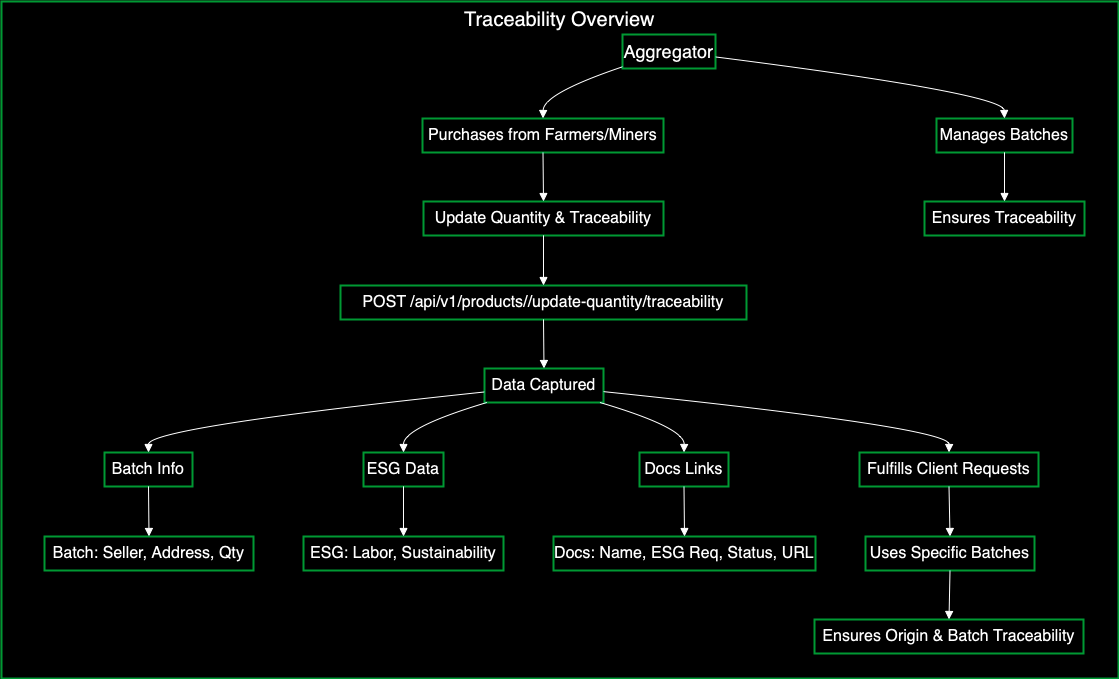
The following steps will show you how to achieve Traceability on the platform:
1. Creating and Setting Up Your Account
1.1. Create an Account
- Visit the Trace platform's homepage.
- Click on the Sign Up button.
- Fill in the required details: email, password, and any other necessary information.
- Verify your email address by clicking the verification link sent to your inbox.
- Log in to your newly created account.
1.2. Set Up Your Profile
- Navigate to the Profile section after logging in.
- Fill in your profile information, including your name, business details, and contact information.
- Save your profile settings.
2. Managing Local Sellers
Local sellers play a crucial role in maintaining product traceability within the platform. By registering and updating their information, local sellers ensure that accurate data about the product's origin, handling, and compliance with sustainability practices is available to both admins and aggregators.
2.1. Register a Local Seller(Aggregator)
Aggregators serve as the middlemen between farmers/miners and Sabi. Before you can start tracking traceability, you need to register local sellers.
To register a local seller, use the POST /api/v1/local-sellers endpoint.
Required Parameters
tenantId(header)userId(header)
Request Body Parameters
| Field | Type | Description |
|---|---|---|
quantity | Number | The quantity of the product to be updated. |
batches | Array | A list of batch details associated with the product update. |
batches.docLinks | Array | A list of document links related to ESG compliance and other requirements. |
batches.docLinks.name | String | The name of the document (e.g., "SUSTAINABILITY"). |
batches.docLinks.esgRequirement | String | The ESG requirement related to the document (e.g., "LABOR_PRACTICES"). |
batches.docLinks.status | String | Compliance status (e.g., "NON_COMPLIANT"). |
batches.docLinks.link | String | A URL link to the document. |
batches.localSeller | String | The name of the local seller associated with the batch. |
batches.addressId | String | The ID of the address related to the batch. |
batches.quantity | Number | The quantity in the batch. |
batches.weight | Number | The weight of the product in the batch. |
batches.unit | String | The unit of measurement (e.g., "Barrels"). |
batches.onloadingDate | String | The date when the product was loaded. |
batches.offloadDate | String | The date when the product was offloaded. |
batches.offloadPersonnelPhone | String | The phone number of the person responsible for offloading the product. |
batches.offloadPersonnelName | String | The name of the person responsible for offloading the product. |
batches.testCoverage | Boolean | Indicates whether the batch has test coverage. |
userId | String | The ID of the user making the update. |
Example Request Body
{
  "type": "FARMER",
  "firstName": "string",
  "lastName": "string",
  "email": "string",
  "country": {
    "name": "string",
    "code": "string",
    "currency": "string"
  },
  "state": {
    "name": "string",
    "code": "string"
  },
  "lga": {
    "name": "string",
    "code": "string"
  },
  "address": "string",
  "phone": "string",
  "photo": "string",
  "dob": "2024-09-06T18:19:26.751Z",
  "nin": 0,
  "ninDocument": "string",
  "addresses": [
    {
      "docLinks": [
        {
          "name": "SUSTAINABILITY",
          "esgRequirement": "LABOR_PRACTICES",
          "status": "NON_COMPLIANT",
          "link": "string"
        }
      ],
      "name": "string",
      "address": "string",
      "country": {
        "name": "string",
        "code": "string",
        "currency": "string"
      },
      "state": {
        "name": "string",
        "code": "string"
      },
      "lga": {
        "name": "string",
        "code": "string"
      },
      "latitude": 0,
      "longitude": 0,
      "location": {
        "type": "string",
        "coordinates": [
          "string"
        ]
      },
      "size": 0
    }
  ],
  "businessId": "string",
  "userId": "string",
  "tenantId": "string"
}
2.2. Update Local Seller Information
To update a local seller's details, use the PATCH /api/v1/local-sellers/{localSellerId} endpoint.
Required Parameters
localSellerId(path)tenantId(header)userId(header)countryCode(header)
Request Body
| Field | Type | Description |
|---|---|---|
type | String | The type of local seller (e.g., "FARMER"). |
firstName | String | First name of the local seller. |
lastName | String | Last name of the local seller. |
email | String | Email address of the local seller. |
country.name | String | Name of the country. |
country.code | String | Country code (ISO). |
country.currency | String | Currency used in the country. |
state.name | String | Name of the state where the seller is located. |
state.code | String | Code for the state. |
lga.name | String | Name of the Local Government Area (LGA). |
lga.code | String | LGA code. |
address | String | Physical address of the seller. |
phone | String | Phone number of the seller. |
photo | String | URL to the photo of the seller. |
dob | Number | Date of birth of the seller. |
nin | Number | National Identification Number (NIN). |
ninDocument | String | Link to the NIN document. |
addresses | Array | List of addresses associated with the local seller. |
businessId | String | The business ID associated with the seller. |
userId | String | User ID associated with the request. |
tenantId | String | Tenant ID representing the organization. |
Sample Request Body
{
  "type": "FARMER",
  "firstName": "string",
  "lastName": "string",
  "email": "string",
  "country": {
    "name": "string",
    "code": "string",
    "currency": "string"
  },
  "state": {
    "name": "string",
    "code": "string"
  },
  "lga": {
    "name": "string",
    "code": "string"
  },
  "address": "string",
  "phone": "string",
  "photo": "string",
  "dob": 0,
  "nin": 0,
  "ninDocument": 0,
  "addresses": [
    {
      "docLinks": [
        {
          "name": "SUSTAINABILITY",
          "esgRequirement": "LABOR_PRACTICES",
          "status": "NON_COMPLIANT",
          "link": "string"
        }
      ],
      "name": "string",
      "address": "string",
      "country": {
        "name": "string",
        "code": "string",
        "currency": "string"
      },
      "state": {
        "name": "string",
        "code": "string"
      },
      "lga": {
        "name": "string",
        "code": "string"
      },
      "latitude": 0,
      "longitude": 0,
      "location": {
        "type": "string",
        "coordinates": ["string"]
      },
      "size": 0
    }
  ],
  "businessId": "string",
  "userId": "string",
  "tenantId": "string"
}
3. Batch Handling for Product Traceability
Managing product batches is essential for maintaining traceability, especially when an aggregator purchases goods from multiple sources. This action allows you to update the quantity of a product while attaching traceability information, such as batch details and ESG compliance.
To update product quantity and batch information, use the POST /api/v1/products/{productId}/update-quantity/traceability endpoint.
Purpose:
- Update the quantity of a product.
- Attach traceability details, including batch information and ESG compliance data.
How to Use:
Path Parameter:
productId(required): The unique identifier of the product being updated.
Header Parameters:
userId(required): The ID of the user performing the update.tenantId(required): The tenant ID for the organization.countryCode(required): The country code related to the update.
Request Body:
| Field | Type | Description |
|---|---|---|
quantity | Number | The quantity of the product to be updated. |
batches | Array | A list of batch details associated with the product update. |
batches.docLinks | Array | A list of document links related to ESG compliance and other requirements. |
batches.docLinks.name | String | The name of the document (e.g., "SUSTAINABILITY"). |
batches.docLinks.esgRequirement | String | The ESG requirement related to the document (e.g., "LABOR_PRACTICES"). |
batches.docLinks.status | String | Compliance status (e.g., "NON_COMPLIANT"). |
batches.docLinks.link | String | A URL link to the document. |
batches.localSeller | String | The name of the local seller associated with the batch. |
batches.addressId | String | The ID of the address related to the batch. |
batches.quantity | Number | The quantity in the batch. |
batches.weight | Number | The weight of the product in the batch. |
batches.unit | String | The unit of measurement (e.g., "Barrels"). |
batches.onloadingDate | String | The date when the product was loaded. |
batches.offloadDate | String | The date when the product was offloaded. |
batches.offloadPersonnelPhone | String | The phone number of the person responsible for offloading the product. |
batches.offloadPersonnelName | String | The name of the person responsible for offloading the product. |
batches.testCoverage | Boolean | Indicates whether the batch has test coverage. |
userId | String | The ID of the user making the update. |
Example Request Body:
{
  "quantity": 0,
  "batches": [
    {
      "docLinks": [
        {
          "name": "SUSTAINABILITY",
          "esgRequirement": "LABOR_PRACTICES",
          "status": "NON_COMPLIANT",
          "link": "https://example.com/sustainability-doc"
        }
      ],
      "localSeller": "John's Farm",
      "addressId": "address123",
      "quantity": 100,
      "weight": 500,
      "unit": "Barrels",
      "onloadingDate": "2024-08-01",
      "offloadDate": "2024-08-02",
      "offloadPersonnelPhone": "+1234567890",
      "offloadPersonnelName": "Jane Doe",
      "testCoverage": true
    }
  ],
  "userId": "user123"
}
Example Scenario:
Imagine an aggregator, Kehinde, who purchases 100 units of cocoa from three local sellers, each providing different batches. When a client, Frank, requests 40 units of cocoa, Kehinde can fulfill the order by selecting specific batches from each seller. This process ensures that Frank receives a product with complete traceability, knowing exactly which batch and seller each unit came from.
4. Manual Traceability for Special Clients
To manually override default traceability for special clients, use the PATCH /api/v1/trades/{tradeId}/traceability/manual endpoint.
Purpose:
- Manually update traceability details, including batch quantities.
How to Use:
Path Parameter:
tradeId(required):
The unique identifier of the trade being updated.
Header Parameters:
-
userId(required):
The ID of the user performing the action. -
tenantId(required):
The tenant ID for the organization. -
countryCode(required):
The country code related to the update.
Request Body:
| Field | Type | Description |
|---|---|---|
batches | Array | A list of batch details associated with the trade update. |
batches.batchId | String | The unique identifier of the batch. |
batches.quantity | Number | The quantity of items in the batch. |
userId | String | The ID of the user making the update. |
tenantId | String | The tenant ID associated with the trade. |
countryCode | String | The country code associated with the trade. |
Example Request Body:
{
  "batches": [
    {
      "batchId": "batch-123",
      "quantity": 50
    }
  ],
  "userId": "user-123",
  "tenantId": "tenant-456",
  "countryCode": "NG"
}
5. Retrieve Traceability for a Trade
This action retrieves detailed traceability information for a specific trade.
To view traceability records for a specific trade, you can use GET /api/v1/trades/{tradeId}/traceability endpoint.
How to Use:
- Path Parameter:
tradeId(required): The unique identifier of the trade.
- Header Parameters:
userId(required): The ID of the user requesting the information.tenantId(required): The tenant ID for the organization.
6. Admin-Specific Actions
This section is dedicated to actions available for users who have admin accounts on the Trace platform.
6.1. Admin: Updating Product Quantity with Traceability
Admins have access to additional tools for updating product quantities with traceability details.
To update product quantity and batches, users with admin accounts can use this POST /api/v1/admins/products/{productId}/update-quantity/traceability endpoint.
Purpose:
- Admins can update product quantities and attach traceability information.
How to Use:
- Path Parameter:
productId(required): The unique identifier of the product.
Request Body:
| Field | Type | Description |
|---|---|---|
quantity | Number | The quantity of the product to be updated. |
batches | Array | A list of batch details associated with the product update. |
batches.docLinks | Array | A list of document links related to ESG compliance and other requirements. |
batches.docLinks.name | String | The name of the document (e.g., "SUSTAINABILITY"). |
batches.docLinks.esgRequirement | String | The ESG requirement related to the document (e.g., "LABOR_PRACTICES"). |
batches.docLinks.status | String | Compliance status (e.g., "NON_COMPLIANT"). |
batches.docLinks.link | String | A URL link to the document. |
batches.localSeller | String | The name of the local seller associated with the batch. |
batches.addressId | String | The ID of the address related to the batch. |
batches.quantity | Number | The quantity in the batch. |
batches.weight | Number | The weight of the product in the batch. |
batches.unit | String | The unit of measurement (e.g., "Barrels"). |
batches.onloadingDate | String | The date when the product was loaded. |
batches.offloadDate | String | The date when the product was offloaded. |
batches.offloadPersonnelPhone | String | The phone number of the person responsible for offloading the product. |
batches.offloadPersonnelName | String | The name of the person responsible for offloading the product. |
batches.testCoverage | Boolean | Indicates whether the batch has test coverage. |
userId | String | The ID of the user making the update. |
Example Request Body
{
  "quantity": 0,
  "batches": [
    {
      "docLinks": [
        {
          "name": "SUSTAINABILITY",
          "esgRequirement": "LABOR_PRACTICES",
          "status": "NON_COMPLIANT",
          "link": "string"
        }
      ],
      "localSeller": "string",
      "addressId": "string",
      "quantity": 0,
      "weight": 0,
      "unit": "Barrels",
      "onloadingDate": "string",
      "offloadDate": "string",
      "offloadPersonnelPhone": "string",
      "offloadPersonnelName": "string",
      "testCoverage": false
    }
  ],
  "userId": "string"
}
6.2. Admin: Retrieve Product Custody History
Admins can retrieve the custody history for a product to ensure traceability.
To retrieve product custody history, admins can use the GET /api/v1/admins/products/{productId}/custody/history endpoint.
How to Use:
- Path Parameter:
productId(required): The unique identifier of the product.
6.3. Admin: Manual Update of Trade Traceability
Admins can manually update traceability details, including batch quantities, for a trade.
To manually update traceability details, including batch quantities, admins can use this PATCH /api/v1/admins/trades/{tradeId}/traceability/manual endpoint.
How to Use:
- Path Parameter:
tradeId(required): The unique identifier of the trade being updated.
Request Body:
| Field | Type | Description |
|---|---|---|
batches | Array | A list of batches with updated quantities. |
batches.batchId | String | The unique identifier of the batch. |
batches.quantity | Number | The updated quantity of the batch. |
userId | String | The ID of the user performing the update. |
tenantId | String | The tenant ID for the organization. |
countryCode | String | The country code related to the trade. |
Example Request Body
{
  "batches": [
    {
      "batchId": "string",
      "quantity": 0
    }
  ],
  "userId": "string",
  "tenantId": "string",
  "countryCode": "string"
}
6.4. Admin: Retrieve Trade Traceability
Admins can retrieve detailed traceability information for a specific trade.
To view traceability records for a specific trade, admins can use the GET /api/v1/admins/trades/{tradeId}/traceability endpoint.
How to Use:
-
Path Parameter:
tradeId(required): The unique identifier of the trade.
-
Header Parameters:
tenantId(required): The tenant ID for the organization.userId(required): The ID of the user requesting the information.